Trevo - Developer Guide
1. Setup & Installation
- Backend: Node.js LTS version, Express
- Frontend: ReactJS, minimal dependencies
- Connection: Uses Axios in Frontend
- Clone:
//Available only for Developer working in Project-37
- Run Locally:
npm install (Backend) && npm start (Root)
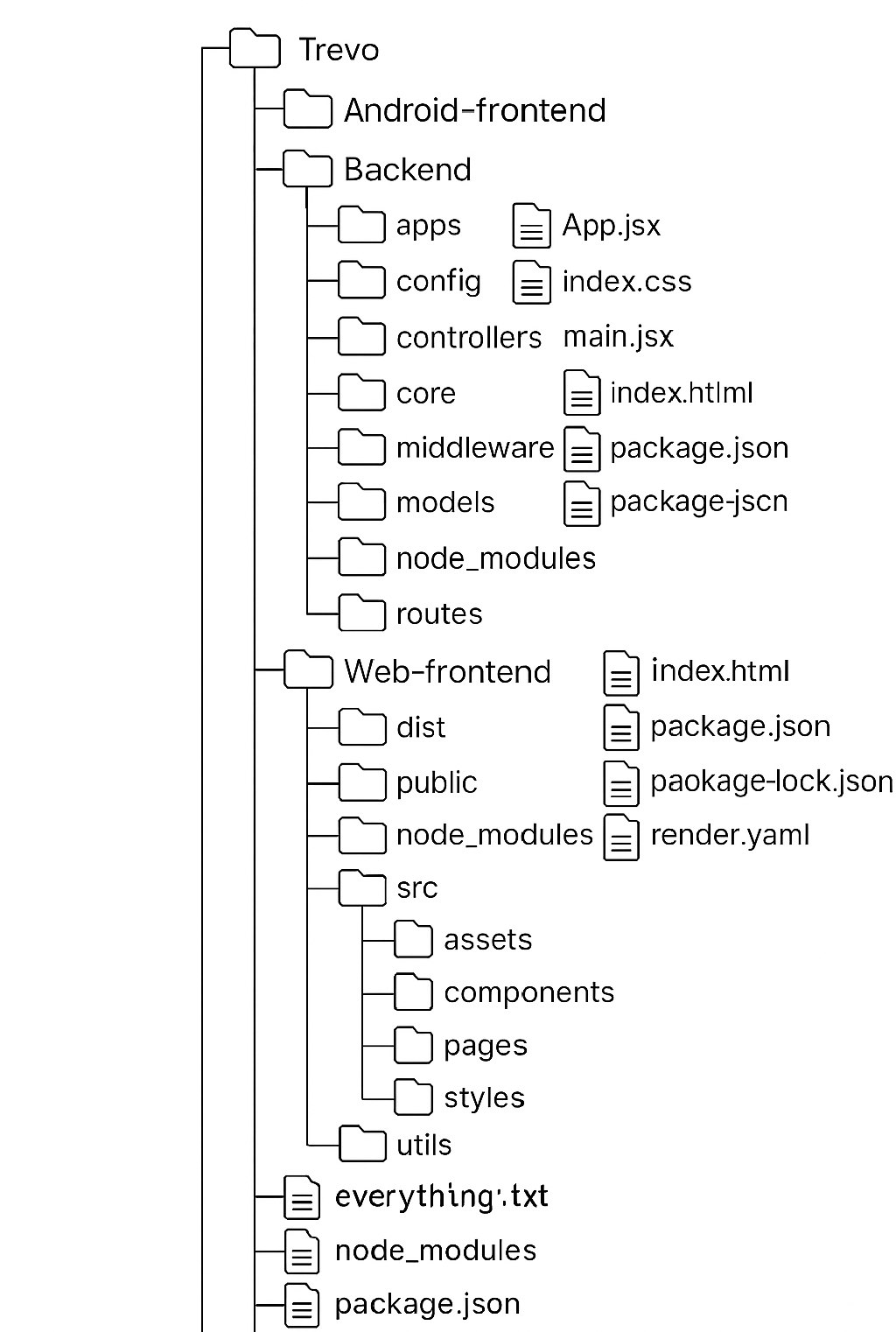
2. Project Structure
/Web-frontend – All client-side files for Web (JSX)/Backend – API routes, database models, controllers, middleware/Android-frontend – Uses WebView in Android
3. Authentication Flow
Trevo uses session-based authentication.
- Signup → Token Generation
- Login → Token Validation
- Tokens stored in localStorage
[Auth Flow Diagram]
4. API Integration
- RESTful endpoints:
/api/[models to crud]
- Middleware includes validation protecting all the routes
[Sample API Request]
5. AI Messaging Interface
Core feature using OpenAI-compatible API:
- Message parsing and context mapping
- App-to-app communication logic
- Sample prompt routing in
routes/messsage.js
[AI Flow Chart]
Note: Contributions welcome! Just read the User Manual for Trevo App Development CONTRIBUTING.md for code system and contribute to the Trevo ecosystem.